iDesktop Quick Start Guide
Introduction
iDesktop is a web-based desktop management software.
It can help IT administrators more effectively manage and monitor desktops, servers, software applications
and other devices.
Installation
Download and run iDesktop installer. Supported platforms include Windows XP, Vista, Seven, and Windows Server 2003/2008.
By default, iDesktop server runs on port 9010, but you can change it to another port during installation.
After installation, you can bring up your web browser and go to http://localhost:9010 to access iDesktop.
Deploy Agents
iDesktop agent needs to be installed on desktops. Agents can connect to the server via secure SSL connection.
Ways to install agent:
- Download agent installer (agent_installer.exe) from the iDesktop server, and then install it on each desktop.
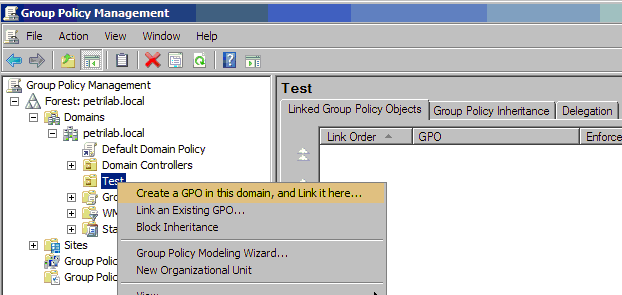
- Or use GPO to deploy agents. Detailed steps.
Main User Interface
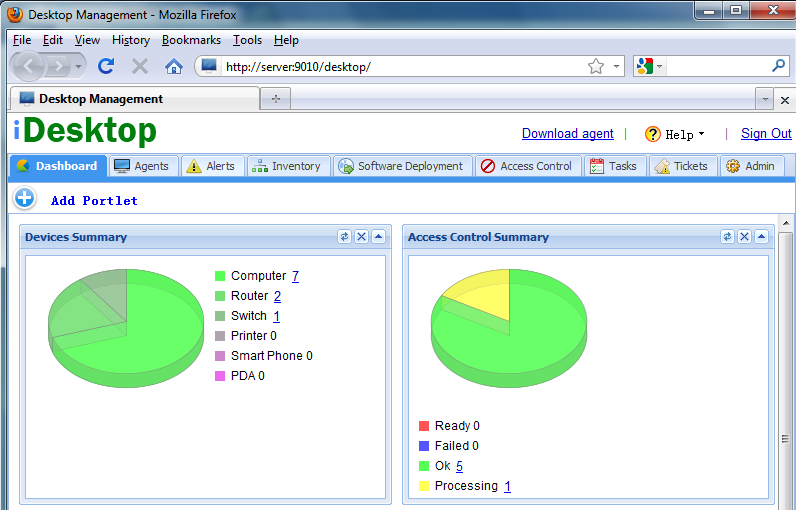
Dashboard Tab
Displays summary in portlet format. You can add/remove/move portlets, or drag and drop portlets to different locations.
Agents Tab

Displays the status of agents. For each agent, by clicking its small icons, you can do
- File Management
Manages files/directories on desktop, including upload/download/delete/create/move/rename files or directories.
- Remote Desktop Support
IT administrator can view and control the remote desktop.
- Scan Inventory
Tells the agent to scan its hardware and software inventory.
- Alert Settings
Changes the alert settings of the agent.
- Chat
Chats instantly with the agent. It will tell the agent to open a chat window so that IT administrator can interact with the person being assisted.
- Execute Commands
Like a shell, executes commands on the agent side and checks the results.
- Take Screenshot
Takes a screenshot. You can also execute a command, screenshot will be updated automatically after the command is finished.
Alerts Tab
Displays alerts and changes settings.
Menu Items:
- Alerts
Displays received alerts.
- Default Alert Settings
The default settings will be applied to all agents deployed after the settings have taken effect.
- Tasks
Creates tasks to change alert settings of selected agents.
Inventory Tab
Shows hardware and software inventory information.
Menu Items:
- Devices
Lists devices discovered by agents.
- Hardware
Displays discovered hardware components.
- Software
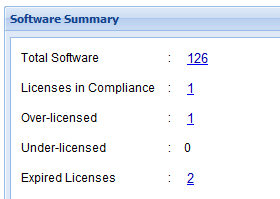
Displays software installed on agents. You can also check license compliance details of the commercial software.
After you enter number of purchased licenses, expiry date, then you can generate reports on license compliance.
- Patch
Displays all the Windows patches installed on agents.
- Scan
Creates new tasks to tell agents to scan inventory data.
Software Deployment Tab
For installing/uninstalling software packages.
Menu Items:
- Tasks
Creates tasks of installing/uninstalling software on agents.
Installers can be MSI or EXE files.
For EXE packages, you need to specify arguments for unattended silent installation. You can refer to
this page for more information.
- Software Repository
Adds new installers to repository.
Parameters, options can be specified for each installer. You can add scripts to be executed before or after installation/uninstallation.
- Script Repository
Adds new scripts to repository. Scripts can be used before or after installation/uninstallation.
Access Control Tab
For restricting certain functions on end-user desktops.
Menu Items:
- Software Restrictions
You can configure to allow or disallow software on remote desktops.
- Registry Restrictions
Configures whether to allow or disallow end user to edit registry settings.
- USB Restrictions
Configures whether to allow or disallow all USB or just USB storage devices.
- CD-ROM Restrictions
Configures whether to allow or disallow CD-ROM.
- Floppy Restrictions
Configures whether to allow or disallow floppy drive.
Task Tab
For executing configuration tasks on end-user desktops.
Menu Items:
- Configuration Tasks
Lists all the tasks and their status info.
You can use the "Add" button to create new tasks. Predefined tasks include firewall, power management, service, hard drive management, scripts, etc.
Pre-defined Tasks:
You can create the following pre-defined tasks, which will be performed immediately or at a later time on selected desktops.
- Firewall
- Turns on or off Windows built-in firewall for selected desktops.
- Allow or block certain ports.
- Check hard drive
Check or fix hard drive using the Windows built-in chkdsk.exe command.
- Clean up hard drive
Clean up disk using the Windows built-in Cleanmgr.exe command.
- Hard drive defragment
Use the built-in defrag.exe to defragment disk drives on selected desktops.
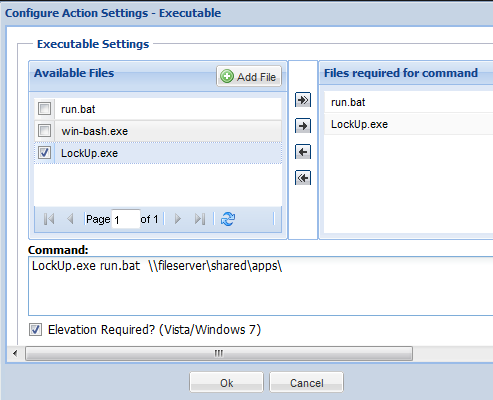
- Executables
Administrator can deploy executable files on remote desktop.
Executable files include scripts, exe and other executable commands.
- Power management
Configure desktops power saving schemes
- Turns off monitor after certain amount of time.
- Turns off hard disk after certain amount of time.
- System standby after certain amount of time.
- Registry settings
Allow administrator to add, modify, or delete registry values on the desktops of users.
- Environment variables
Environment variables are a set of dynamic named values that can affect the way running processes will behave on a computer.
The function allows you to set system or user environment variables on the desktops.
- IE
Allow administrator to set home page and proxy server on the desktops.
- Windows Services
Allow administrator to change the settings of Windows services, such as starting/stopping a service.
- Path
Allow administrator to add system or user path. New path is inserted into the beginning of the existing paths.
- Remote Shutdown
Shutdown remote desktops.
- Wake on LAN
Wakes up remote desktops if Wake-on-LAN feature have been enabled on computer's BIOS.
Ticket Tab
Helps administrators keep track of issues. A ticket can be associated with one or more devices.
There are two types of tickets: request and problem. A request can be a simple question or an incident, which is
any unplanned negative impact on a service. A Problem is the underlying or root cause of one or more requests. A problem can
be linked to one or more requests. If a problem is closed, all its linked requests are closed as well.
A ticket has four states:
- Open
Technician is working on it.
- Pending
Technician is waiting for the requester to respond.
- Resolved
The ticket has been resolved.
- Closed
The ticket reaches its final state, and all its fields are read only.
Only users with admin role can close a ticket.
If a ticket's state is Resolved, and the requester has not responded within a certain period of time, the ticket is closed automatically by system.
If a ticket is in a closed state then all its fields are read only. Only users with admin role can reopen the ticket.
Admin Tab
It is for changing settings of iDesktop.
User Management
There are three types of users:
| Administrator: | has all the privileges. |
| Technician: | can't add/remove other users; can't modify SMTP server settings;
can't change session timeout value; can't close tickets ... |
| End User: | only can view his/her own tickets. End user added by technician or administrator
does not require email validation. |
Email Settings
Configures SMTP server for sending out notification emails.
Recreate Agent
Recreates agent installer because the server parameters such as IP and port have been changed.
Agent Settings
Agent settings will be applied to all agents when they connect to the server.
Be careful with changing the IP, port or proxy info of the server. If any of the parameters are not correct, then agents will lose connection to the server and their settings have to be fixed manually.